


How to Use GenYoutube Online? A Complete User Guide
Most online YouTube video downloaders can only download videos by parsing links, but GenYoutube downloader is distinctive. It can quickly search, preview, and download YouTube videos using keywords, links, tags, and more. Sounds different, right? Now, this article provides a comprehensive and clear GenYoutube online user guide to help you understand how GenYoutube works and avoid some of the pitfalls of using GenYoutube.
Part 1: Key Features of GenYoutube Downloader
| Official Website | Support URLs | Free or Not | Output Format | Output Quality |
| https://www.genyt.net/ | Public YouTube videos | Free | MP4, MP3, WEBM, M4A, 3GP, etc. | Optional |
1️⃣ Which website's videos can you download using GenYoutube?
- GenYoutube only offers downloads of YouTube videos; videos from other non-YouTube websites such as Vimeo, Facebook, and Instagram are not available for download.
2️⃣ Do you need to register in order to use GenYoutube online?
- No account registration or email login is required; you can download YouTube videos simply by opening the GenYoutube website.
3️⃣ What download formats does GenYoutube offer? How is the quality?
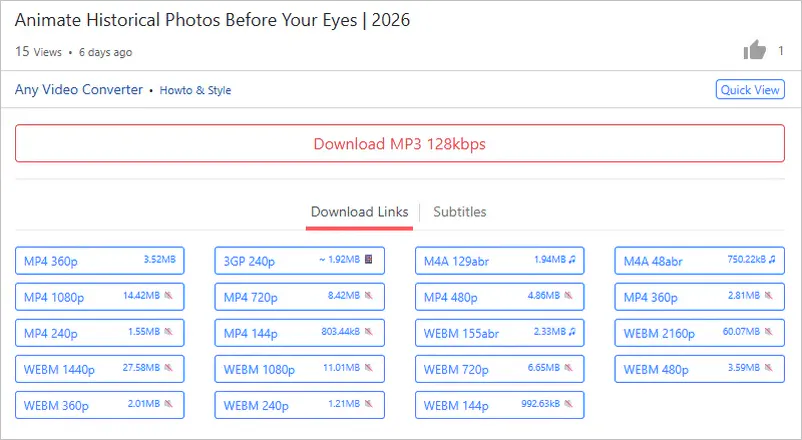
- GenYoutube currently supports MP4, MP3, WEBM, M4A, and other common formats, which should meet the format needs of most users. GenYoutube downloader can output videos at a maximum quality of 1080P, which is higher than other online video downloaders of its kind.
4️⃣ Can GenYoutube download subtitles from YouTube videos?
- GenYoutube can download YouTube videos with embedded subtitles in JSON, SRV, TTML, and VTT formats. This is something most online video downloaders can't do, but GenYoutube make it.
5️⃣ What is the search function on GenYoutube?

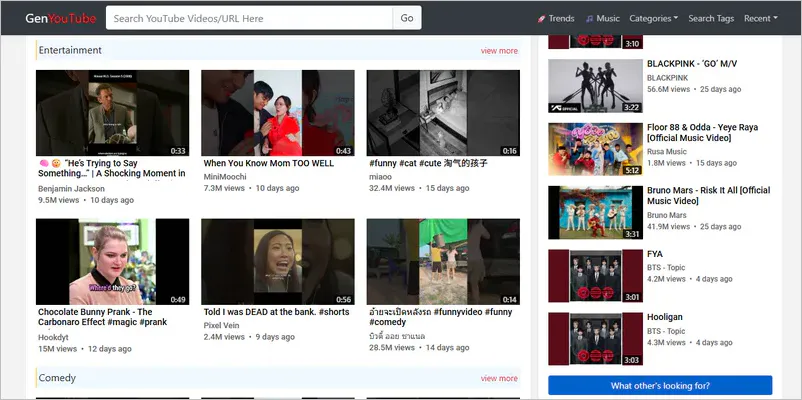
- GenYoutube website integrates keyword search, link parsing, search suggestions, tag search, trending recommendations, category browsing, and dedicated music search. This means you can access YouTube's content library even without going to the official YouTube website.
| Search Type | Function |
| Keyword search | Enter the video title, YouTube channel name, or relevant keywords in the search bar at the top of the GenYoutube website to find content just like on the official YouTube website, without having to switch between websites. |
| Link parsing | The most accurate search method: simply paste the complete YouTube video link to directly access download options without manual searching. |
| Search suggestions | As you start typing, relevant popular search terms or matching video titles will usually pop up below the search box, improving your search efficiency. |
| Tag search | Categorize and filter videos using tags (#playlist, #tutorial) to easily discover content with similar themes. |
| Trending recommendations | Showcases popular or trending videos on YouTube, helping you discover trending content. |
| Category browsing | Filter by film, education, games, and others, suitable for search needs with a clear content category. |
| Music search | A dedicated music video search option allows for quick location of songs, artists, or albums. |
6️⃣ What is the preview function of GenYoutube?
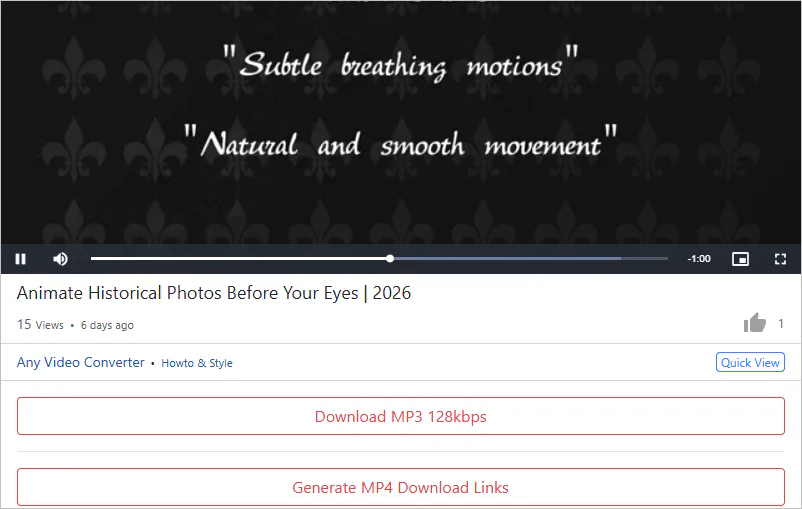
- GenYoutube lets you preview YouTube content directly on your web browser before clicking the download button. By previewing the YouTube video, you can confirm that it's the one you want to download. The preview video also includes a progress bar that you can drag to check if the video file is complete.
7️⃣ How to use GenYoutube online downloader to save YouTube videos on PC?
- Step 1: Use the 7 YouTube video search methods mentioned above to find the video you want to download on the GenYoutube website.
- Step 2: Click "Download MP3" or "Generate MP4 Download Links" to access the download options. Clicking these two options will usually redirect you to an advertising page; please close the redirect page promptly.
- Step 3: Choose the format you want to download from the listed options, then right-click and select "Save as..." to download the YouTube file to your device.
8️⃣ How compatible is GenYoutube with various devices?
- As a web-based online downloader, GenYoutube is perfectly compatible with various mobile and desktop devices because it does not require the installation of any specific ".exe", ".dmg", or ".apk" installation packages. As long as your device has a modern browser installed, you can directly access and use all the features of GenYoutube.
Part 2: Limitations of GenYoutube Online Downloader
- Slow download speed
- No batch download
- The download process will redirect to an ad page
- Download failure rate is high
- High-quality videos can only be downloaded without audio
1️⃣ How slow is the download speed of GenYoutube?
- GenYoutube's download speed typically depends on your network bandwidth and server load. Most online downloaders nowadays experience slower download speeds during peak hours. Additionally, higher quality YouTube files will generally be slower. If you find GenYouTube's download speed extremely slow, it's usually because the site is calling YouTube's raw streaming address, and your network connection to that address is not stable enough.
2️⃣ Which types of YouTube videos cannot be downloaded by GenYoutube?
- GenYoutube cannot download any YouTube movies that require purchase or rental, paid channel content, private videos, live streams, or age-restricted videos.
3️⃣ Why can't GenYoutube download YouTube videos in bulk?
- GenYoutube is a single-page parsing tool; for each download link clicked, the server needs to generate a temporary download address. Batch parsing videos requires significant server computing resources, and most free websites typically do not offer this costly feature. Furthermore, batch downloading can easily trigger YouTube's monitoring, potentially leading to server IP blocking.
- If you need to download in bulk, see here >>
4️⃣ Can you avoid ads on the GenYoutube website?
- Advertising is GenYoutube's only source of revenue to keep it running for free. You can install an ad-blocking plugin on your computer or immediately close the redirected ad page when you click the download button.
5️⃣ What kind of videos downloaded from GenYoutube will have no sound?
- If your video download quality exceeds 720P, GenYoutube can only download muted video files. If the original video was muted by YouTube, the downloaded file will also be silent.
6️⃣ How often does GenYoutube download fail?
- GenYoutube frequently experiences unexpected video download failures, especially when YouTube updates its encryption algorithm or API. Four out of ten YouTube videos may fail to download. During these updates, it suffers widespread download failures until developers fix them. The wait for a fix is often long, so it's best to have a GenYoutube alternative.
Part 3: What Should You Do If GenYoutube Fails to Download
If GenYoutube fails to download YouTube videos, don't bother with it. Choose one of these more stable GenYoutube alternatives that can download online videos just as well!
| GenYoutube | ⭐ Any Video Converter | yt-dlp | |
| Operation | Easy | Easy | Difficulty |
| Video quality | Low | 4K, 8K, HDR videos | 4K, 8K, HDR videos |
| Download speed | Slow | Quick | Quick |
| Security | Low | High | High |
| Feature richness | ❌ | ✔️ | ✔️ |
Any Video Converter - The Best GenYoutube Alternative
GenYoutube is primarily a lightweight browser-based downloader, while Any Video Converter, as a desktop application, offers more advanced features. It covers the entire process from acquiring resources from 1000+ websites (including YouTube) to post-editing. You can download videos in various mainstream formats (MP4, AVI, MKV, MP3, FLAC, M4A, etc.) or convert them to formats specific to your device (Apple, Android, TV, etc.).
Online downloaders like GenYoutube are often rife with misleading ads or virus risks. Any Video Converter, on the other hand, is software installed on your computer, providing a clean and uninterrupted downloading environment. In terms of download capacity, Any Video Converter can queue up and download hundreds of links or playlists at once. Regarding download quality, Any Video Converter can parse and download 4K, 8K, and HDR videos with sound instead of silent ones! It's fair to say that Any Video Converter solves all the download problems associated with GenYoutube online downloader.
- Support over 1000 sites, including YouTube, Vimeo, and Facebook. ✅
- It comes with built-in browser and supports for keywrod search. ✅
- Once the video is downloaded, post-editing will no longer rely on the network. ✅
- Batch download YouTube videos, YouTube Music, YouTube playlists, etc. ✅
- Re-encoding ensures the video can be played on any device. ✅
- The built-in screen recorder saves undownloaded videos. ✅
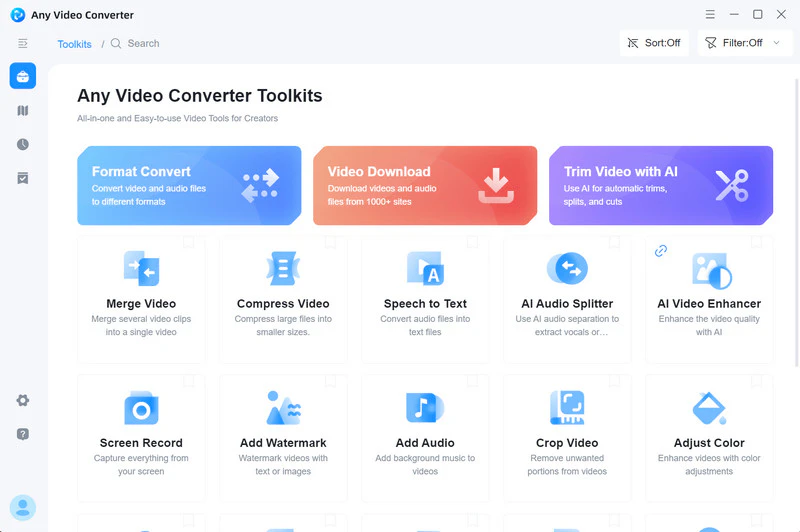
How to Download YouTube Videos with Any Video Converter
Step 1: Select the "Video Download" tool in Any Video Converter.

Step 2: Copy video links you want to download from the YouTube website and paste them into the parsing box. Alternatively, you can use the built-in browser if you don't want to switch between the software and the website.
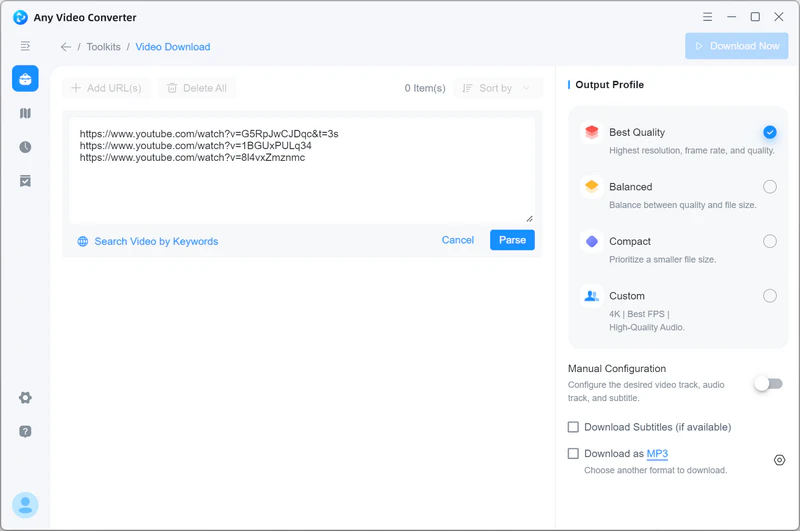
Step 3: Click the "Parse Now" button to start parsing YouTube videos. Before the final download, you can check the file quality, format, and subtitles in the "Output Profile" on the right.
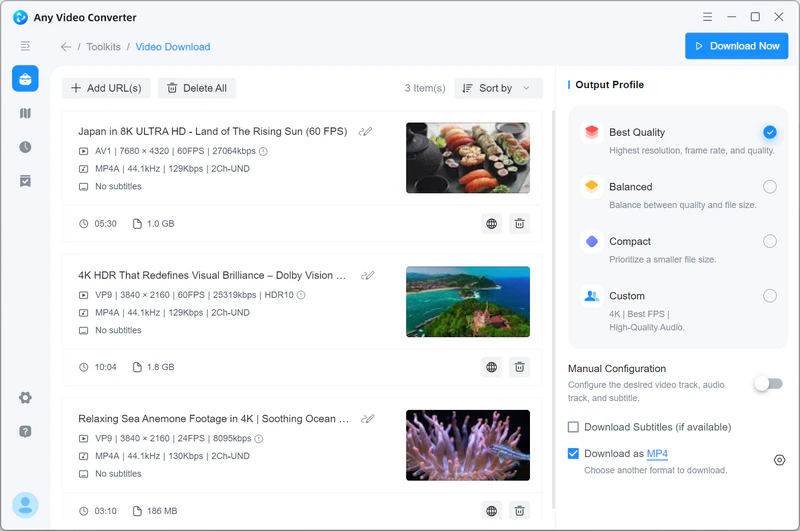
Step 4: Click "Download Now" in the upper right corner to start downloading YouTube videos. It's very simple.
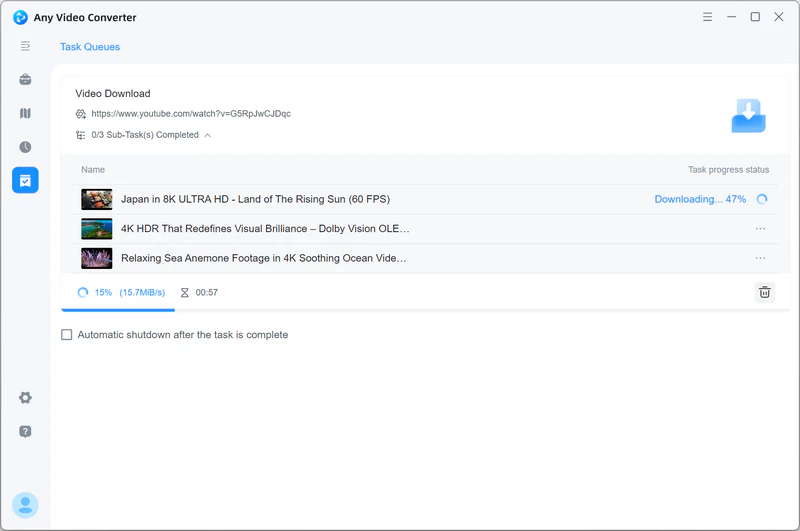
When using Any Video Converter, please be sure to comply with laws and regulations and YouTube's terms of service.
Yt-dlp - The Ultimate GenYoutube Alternative
Yt-dlp is currently recognized globally as the most powerful open-source command-line video downloader. For users who pursue ultimate performance, quality, and technical expertise, it is the ultimate alternative to GenYoutube. Compared to online downloaders like GenYoutube, yt-dlp has overwhelming advantages. It's an open-source project with no pop-ups, malicious plugins, or paid restrictions.
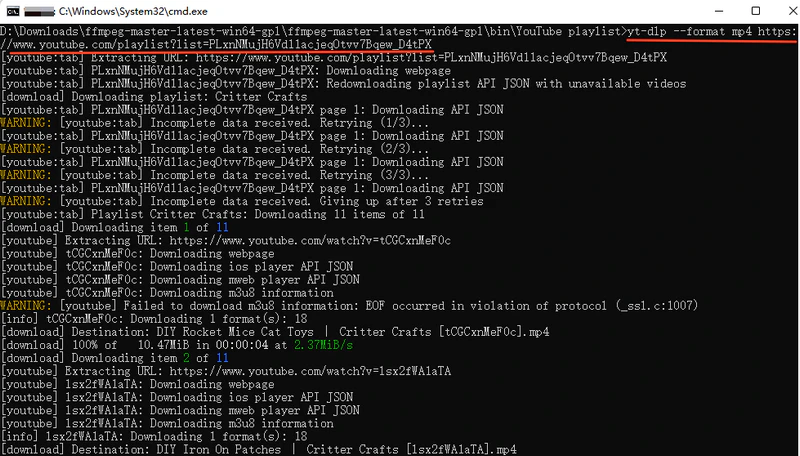
With just a single command, you can download an entire YouTube channel, a whole playlist, or a series of links. It can bypass various download restrictions imposed by YouTube.
How to Download YouTube Videos with yt-dlp
Step 1: Visit the yt-dlp GitHub release page to download the "yt-dlp.exe" file (Windows users) and install FFmpeg.
Step 2: Place "yt-dlp.exe" in a folder, right-click in an empty space in the folder, and select "Open in Terminal".
Step 3: Type the download command and press Enter.
- The basic download command: .\yt-dlp.exe "video URL"
- Download specified format command: .\yt-dlp.exe -f "bestvideo[height=1080]+bestaudio/best" "video URL"
- Batch download command: .\yt-dlp.exe --yes-playlist "video URL"
- Download the video with subtitles command: .\yt-dlp.exe --write-auto-subs --convert-subs srt "video URL"
Part 4: FAQs about GenYoutube
Q1: Is GenYoutube safe?
The main risk on GenYoutube comes from its advertising. As long as you don't click on any suspicious ads, download ".exe" or ".pkg" installation files, or enter personal information, you usually won't have any major problems.
Q2: Is GenYoutube legal?
GenYoutube operates in a legal gray area and violates platform terms. In many regions, personal offline viewing (without distribution or commercial use) is generally not subject to legal action, but large-scale distribution or commercial use faces extremely high legal risks.
Q3: Does GenYoutube work on Mac?
Yes. GenYoutube is an online downloader that is not dependent on any specific operating system. As long as you access the website on a Mac using Safari, Chrome, or Firefox, the process is exactly the same as on Windows.
Q4: How can I avoid exposing my privacy on GenYoutube?
We recommend installing an ad blocker to block malicious ads; you can also use your browser's "private window" to prevent websites from leaving cookies or browsing history. If you are concerned about your IP address being logged, you can use a VPN to hide your real network location.
Q5: Can GenYoutube download private videos?
No. Private videos can only be viewed by the uploader or a specific authorized account. GenYoutube cannot bypass YouTube's security verification to access private content.
Q6: Why can't I open the GenYoutube website?
If you cannot access the GenYoutube website, it may be because it is blacklisted in your region, or it may be because GenYoutube has changed its domain name suffix. Using a program like Any Video Converter will prevent this issue.
Final Thoughts
GenYoutube, with its unique keyword search and preview features, does offer a convenient, installation-free video download solution. However, with frequent updates to YouTube's encryption algorithm, GenYoutube's limitations are becoming increasingly apparent, especially the issue of "video without sound" when downloading HD videos, which definitely affects the viewing experience.
If you're looking for a more professional, versatile, and ad-free alternative, Any Video Converter is undoubtedly the best GenYoutube alternative. It not only overcomes all the limitations of GenYoutube but also integrates video editing, format conversion, screen recording, and many other powerful features, providing a one-stop service from video acquisition to post-processing. For users who prioritize ultimate efficiency and high-quality downloads, abandoning the unstable GenYoutube and switching to a stable desktop client like Any Video Converter will make your video download experience simpler, more efficient, and safer.
Of course, you can also use the yt-dlp command line tool. However, if you are not proficient in computer technology, you will need to spend time learning this GenYoutube alternative.


Besty Smith | Content Writer
Besty Smith is a talented and insightful content creator with a keen interest and passion for software programs. She focuses on in-depth research and hands-on experience with various types of software, providing readers with in-depth and inspiring content through precise writing. With her keen insight into the software industry, Besty is committed to helping readers keep abreast of the latest industry trends so that they can stay competitive in the digital age.