Part 1: Is OGMP3 Safe for YouTube to MP3 Downloads
Publicly available test results indicate that OGMP3 does not contain obvious malware, but it does present certain risk signals. Security rating platforms hold differing opinions. For example:
- Scamadviser gives it a "Very Likely Safe" rating because the website's SSL is working properly and it is not listed on any major blacklists.
- Scam Detector gives a moderately low trust score, indicating that such online MP3 converters are high-risk tools.
- Gridinsoft also gives it a "Trusted but Verify" rating.
| Online Audio Conversion Safety |
Risk Degree |
| Browsing Safety |
Fake domains may appear |
| Output File (MP3) |
No obvious malware was found during testing |
| Privacy |
The service does not require an account |
| Long-Term Use |
The website availability and domain stability may change over time |
So, is OGMP3 safe to use for YouTube audio extraction? In short, if you only occasionally convert YouTube audio and are careful to avoid ad traps, OGMP3 appears relatively safe for occasional use (HTTPS encryption / no account registration required / runs within the browser).
👉 Make sure to bookmark this URL: https://ogmp3.com/anx/
In current testing, the OGMP3 website appears relatively clean with minimal advertising. However, the OGMP3 team can always increase website revenue through advertising. Therefore, strictly following the tips below for saving audio offline is essential.
How to Reduce Risks When Using OGMP3
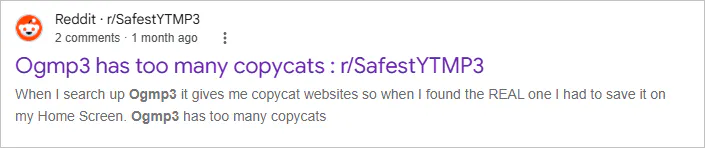
1. Verify the URL carefully. Similar names, mirror sites, and domain changes can make it difficult to identify the genuine OGMP3 website.
2. Avoid unexpected downloads. Do not install any unknown files. The expected download should be an audio file.
3. Download only authorized content. Save audio files that you own, or have permission to download.
Part 2: OGMP3 Hands-on Test and Results
As an online tool primarily focused on converting YouTube videos to MP3, OGMP3's key feature is helping you quickly extract audio content from YouTube videos and convert it into MP3 files for local storage. It prioritizes a lightweight, web-based experience, allowing you to download YouTube audio without needing to install a program.
OGMP3 Step-by-Step Tutorial
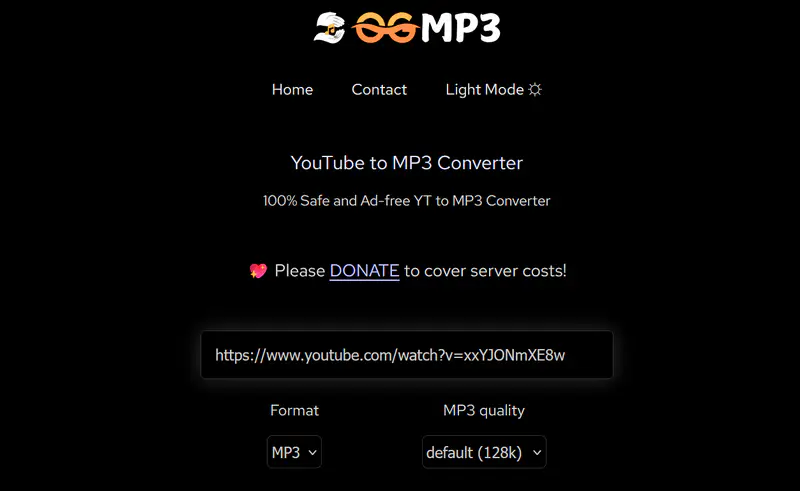
Step 1: Copy the YouTube video link and paste it into the input box on the OGMP3 website.
Step 2: Select the MP3 format and bitrate at the bottom of the input box.
Step 3: Click the "Download" button. The website server will begin parsing the YouTube video and extracting the audio track.
Step 4: After parsing is complete, a "Download" button and a "Cut" button will appear on the page. You can choose to directly download the MP3 file to your device or trim the highlights.
| Tested URL |
https://ogmp3.com/anx/ |
| Last Tested |
September 2026 |
| 5-minute public video |
✅ Pass |
| 60-minute podcast |
✅ Pass (limited to 4 hours) |
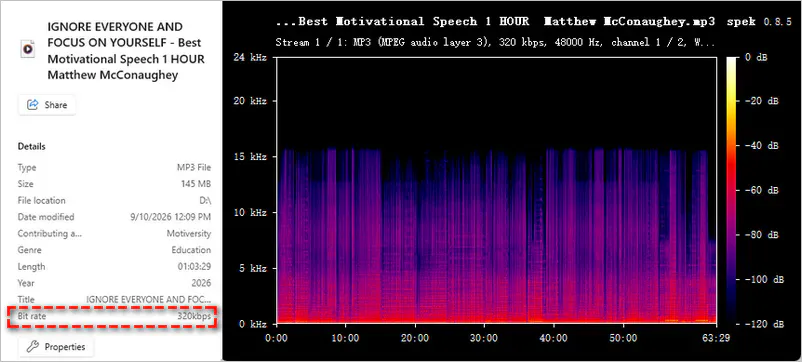
| 320 kbps output |
Not true 320 kbps quality |
| Spectral result |
0–15 kHz (detected by Spek) |
| Cut audio function |
✅ Pass |
| Pop-ups/redirects |
No pop-ups or redirects during our test |
| Playlist URL |
❌ Fail |
My Personal Impressions:
If you simply want to quickly convert a YouTube video, OGMP3 can handle the task. However, as the table above shows, the output is not a real 320 kbps MP3 file, and it does not support playlist downloads.
Looking for a comprehensive video and audio downloading solution? Any Video Converter fully supports batch URL parsing and YouTube playlist downloading, offering output in various audio formats such as MP3, M4A, and Opus. You can also download long podcasts and use built-in tools to trim clips, adjust volume, and apply audio effects.
Part 3: What OGMP3 Cannot Do for YouTube Downloads
| Limitation |
What I Found |
| 🚫 Private & restricted videos |
Cannot download private, members-only, or age-restricted YouTube videos |
| ⏳ Long videos |
Long videos may take longer to process;
conversion fails for videos exceeding 4 hours |
| 🎵 Audio formats |
Lacks audio formats other than MP3 |
| ✂️ Audio editing |
No volume adjustment, or audio editing tools |
| ⛓️ Playlist downloads |
Cannot download playlists or multiple videos at once |
| 🌐 Domain stability |
Domains may change frequently |
3.1. Cannot Download Private or Restricted YouTube Videos
OGMP3 only works with public YouTube videos. It cannot access:
- Private videos
- Members-only content
- Age-restricted videos
3.2. Long Videos May Cause Conversion Failures
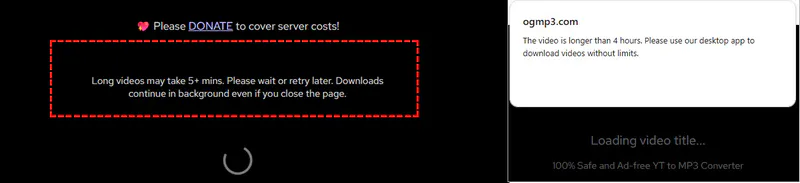
Long videos may take 5+ mins. When YouTube videos are excessively long (over one hour), the MP3 conversion stability may decline. During testing, I encountered:
- Slow conversion speed for long video conversion
- Failed to convert video longer than 4 hours
3.3. Limited Support for Audio Formats
OGMP3 focuses on MP3 extraction. It lacks:
- Options for WAV, FLAC, AAC, OGG, and other lossless audio formats
- Audio codec choices
- Custom quality settings
3.4. No Advanced Audio Editing Features
OGMP3 is an "on-demand online YouTube conversion" tool and does not offer advanced audio editing features
- Adjusting volume
- Removing noise
- Adding audio effects
3.5. No Batch YouTube (Playlist) to MP3 Support
OGMP3 can only convert a single YouTube video at a time and does not support batch downloads.
- Add multiple URLs at once
- Download all the videos in YouTube playlists
- Select specific videos from a channel
3.6. Domain Availability May Change
Like most YouTube to MP3 sites, OGMP3 cannot guarantee domain stability. It frequently changes its domain name due to copyright issues, server-related problems, or operational reasons. You may encounter:
- Domain changes
- Temporary downtime
- Unavailable mirrors
To summarize briefly, if you need to download age-restricted or long YouTube videos or are looking for advanced editing features and a stable online audio download, consider these OGMP3 alternatives below instead of using OGMP3.
Part 4: Best YouTube to MP3 Alternatives to OGMP3
| OGMP3 Alternatives |
Long Video |
Batch Downloads |
Advanced Features |
| Any Video Converter |
✔️ |
✔️ |
Auto YouTube to MP3 download, auto file renaming, audio editing, and more |
| YouTube Multi Downloader |
✔️ |
❌ |
MP3/M4A/WEBM audio options and playlist parsing support |
| TubeRipper |
✔️ |
❌ |
MP3/M4A, WEBM/FLAC, OGG/OPUS/WAV audio options |
4.1. Any Video Converter
When your download tasks increase, you may encounter some limitations when using OGMP3. However, Any Video Converter excels at these situation. It supports batch-adding YouTube URLs, parsing playlists at once, and downloading newly updated videos. Regarding audio output, it offers formats such as MP3, FLAC, and Opus, and allows you to select the audio quality.
Once the YouTube to MP3 download is complete, you can perform basic editing tasks—such as trimming, adjusting volume, AI audio splitting, speech-to-text transcription, and audio merging—without switching to another application.
Key Features of Any Video Converter
- Batch download long YouTube videos and playlists
- High download stability and automatic video updates
- Additional high-quality WAV and FLAC audio formats
- Customizable audio bitrates and output parameters
- MP3 download support for 1,000+ websites
How to Save YouTube Audio for Offline Playback in Any Video Converter
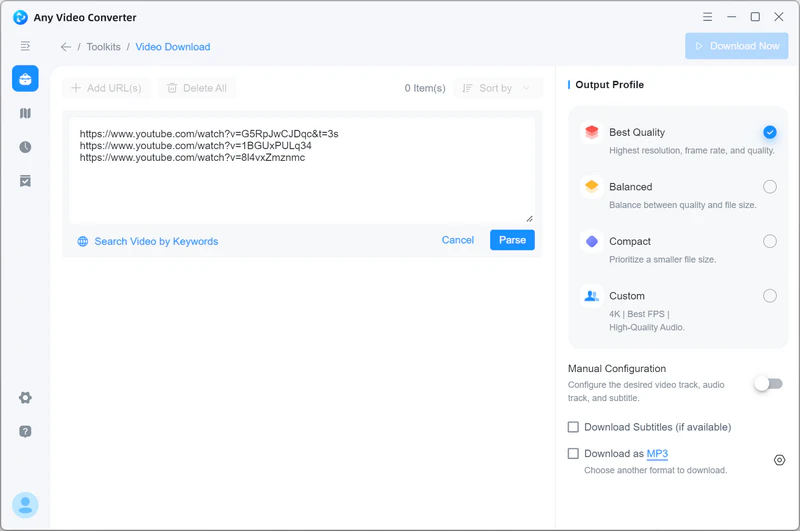
Step 1 Paste the copied YouTube video links into the Video Download search box. Click "Parse Now", then wait for the software to automatically analyze the video information.
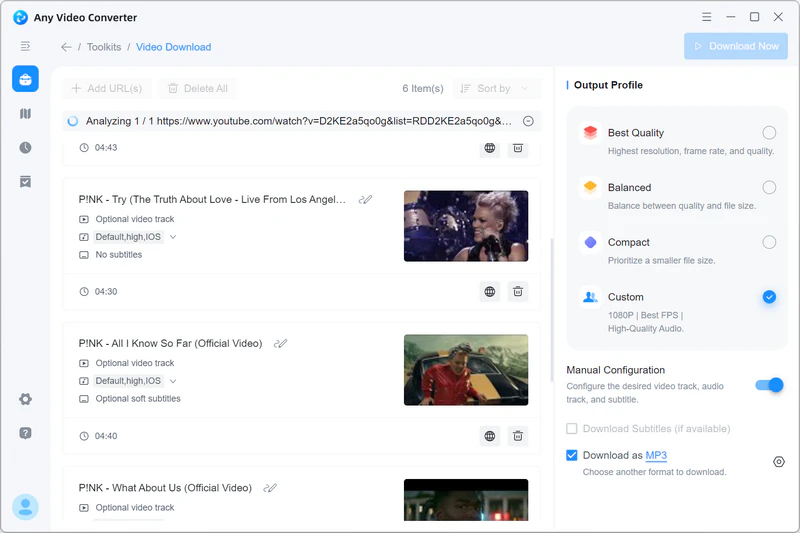
Step 2 Under "Custom", select "Download as MP3". The program downloads the highest audio quality by default.
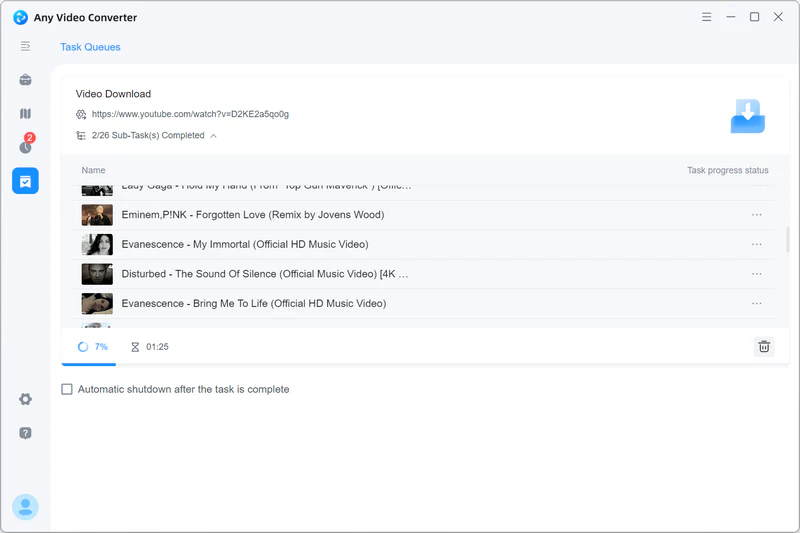
Step 3 Click "Download Now" to start converting YouTube videos to MP3 files.
Pros:
✔️ Parse YouTube playlists and select videos for download
✔️ MP3, M4A, Opus, and various other audio formats
✔️ Download video and audio content exceeding 4 hours
✔️ Built-in basic audio editing features
✔️ Convert SoundCloud, Mixcloud, and Bandcamp content to MP3
Cons:
❌ Software installation required
My Personal Impressions:
During testing, Any Video Converter was able to process multiple YouTube links simultaneously, as well as parse playlists and allow for the selection of specific videos. Compared to online conversion tools, it offers a long-term solution. The downside is that it requires installation.
4.2. YTMultiDownloader
YTMultiDownloader offers higher quality M4A/WEBM audio formats and analyzes the entire playlist. It allows you to download YouTube content as video-only, audio-only, or video+audio.
Step 1: Paste the YouTube video link on the official YTMultiDownloader website.
Step 2: Click "Fetch Video Details" to get all the video content. Click "Load Options" to access MP3, M4A, and WEBM audio formats.
Step 3: Click "Download" to save the YouTube audio to your local device.
Pros:
✔️ Supports YouTube playlist parsing
✔️ Video-only, audio-only, and video+audio downloads
✔️ MP3, M4A, and WEBM output formats
Cons:
❌ Cannot download all playlist videos at once
❌ Does not support batch export of playlist audio files
❌ Slow download speed
My Personal Impressions:
It can parse YouTube playlists and display all the videos. I can choose to download the content as video, audio, or a mixed file. However, it downloads videos individually; it cannot export all audio files from the playlist in a single batch.
4.3. TubeRipper
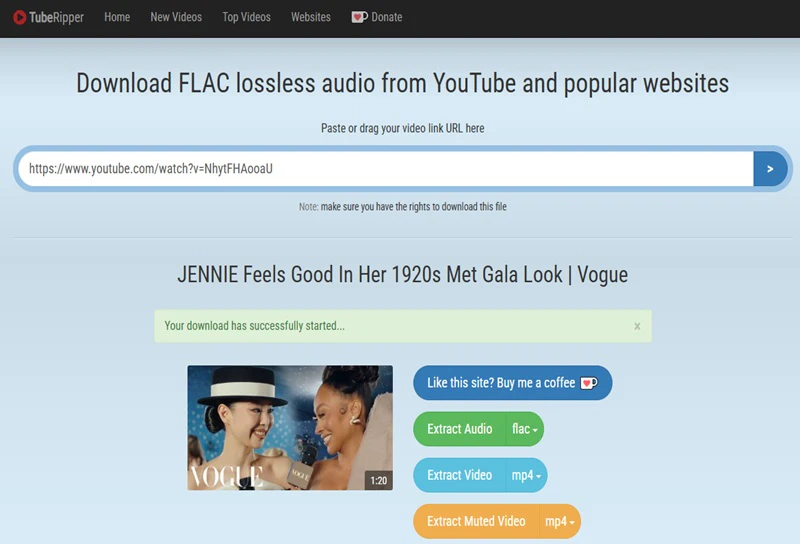
TubeRipper offers a wider range of audio formats than OGMP3, including MP3, M4A, WEBM, FLAC, OGG, OPUS, and WAV. In addition to YouTube, TubeRipper also claims to support conversions from Facebook, TikTok, and SoundCloud to MP3.
Step 1: Open TubeRipper, paste the YouTube link, and press Enter to start analyzing.
Step 2: Select "Extract Audio MP3" to save the YouTube to MP3 file.
Pros:
✔️ MP3, M4A, WEBM, FLAC, OGG, OPUS, and WAV audio formats
✔️ YouTube audio and video extraction
✔️ Facebook, TikTok, and SoundCloud to MP3 supported
Cons:
❌ Only process one URL at a time
❌ No playlist or batch download support
❌ Unstable domain
My Personal Impressions:
Compared to OGMP3, TubeRipper offers more audio format options. During testing, it successfully extracted audio from YouTube videos and allowed me to choose from various MP3 formats. However, the webpage contains excessive ad redirects.
Part 5: FAQs about OGMP3
Why is OGMP3 not working?
This could be due to a broken or restricted YouTube link, a website server malfunction, YouTube changes, or network and regional restrictions. You can try changing your browser, clearing your browser cache, using a VPN, or switching networks. If OGMP3 is unusable for an extended period, just use other YouTube to MP3 alternatives.
Can OGMP3 really download 320 kbps MP3?
No. The actual sound quality is usually limited by the raw audio bitrate of YouTube. YouTube does not provide true lossless 320 kbps MP3 audio sources; YouTube audio is typically encoded at 128 kbps to 256 kbps. Therefore, OGMP3 can only extract the original audio from YouTube, and even if the output is labeled as "320 kbps MP3", this does not mean the actual audio quality reaches 320 kbps.
Does OGMP3 work on Mac?
Yes. Since OGMP3 is a web-based tool, it can be used as long as a Mac can open a browser. First, open "https://ogmp3.com/anx/" in Safari, then paste the YouTube video link to start converting and downloading on Mac.
Why does OGMP3 open pop-up ads?
In tests updated to September 2026, the website (https://ogmp3.com/anx/) has very few pop-ups. If you do encounter spammy pop-ups, please verify that you haven't accessed an incorrect mirror site, and avoid clicking unfamiliar buttons or downloading unknown files.
Can OGMP3 convert YouTube Music?
Yes, but only for public content. OGMP3 cannot access YouTube Music content that requires a Premium account, login, or has access restrictions.
Final Thoughts
Overall, OGMP3 remains a usable YouTube to MP3 converter. However, if you cannot ignore its limitations and require a more stable download process, batch playlist conversion, higher quality audio output, or advanced audio editing features, then switch to a more professional YouTube to MP3 alternative - Any Video Converter, which will provide you with a safer and more reliable long-term conversion.

Besty Smith | Content Writer
Besty Smith is a talented and insightful content creator with a keen interest and passion for software programs. She focuses on in-depth research and hands-on experience with various types of software, providing readers with in-depth and inspiring content through precise writing. With her keen insight into the software industry, Besty is committed to helping readers keep abreast of the latest industry trends so that they can stay competitive in the digital age.