点击“编辑>选项”,或者打开左边文件转换管理器,点击右下角“选项”按钮,选择字幕选项卡,即可打开字幕选项设置窗口,如下图所示:
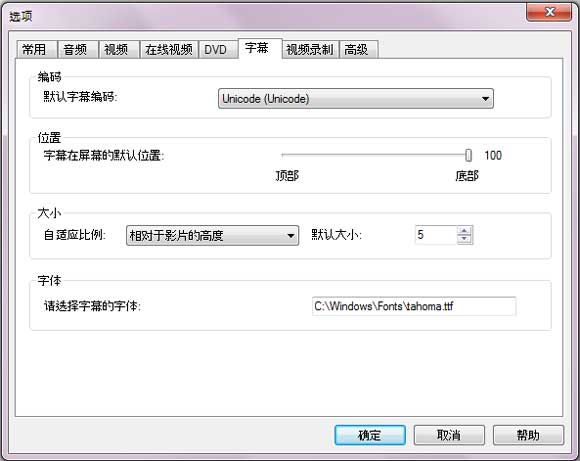
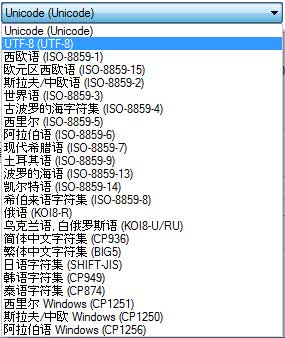
编码
建议选择“UTF-8 (UTF-8)”作为默认字幕编码方式。
位置
调整字幕在屏幕的默认位置。
大小
调整字幕相对于影片的自适应比例,包括:高度、宽度和对角线,同时还可以更改字幕的默认大小。
字体
打开目录C:\ WINDOWS\ FONTS \,右键单击需要选择的字体样式,选择"属性"拷贝相应字体名称,如“ARIAL.TIF”,粘贴到此输入框中将字幕设置为相应字体。
如何给视频添加 .srt 格式字幕,请点击查看:https://www.any-video-converter.com/add-srt-subtitle-to-output-video.php。
轻松给视频文件添加 .srt 格式字幕。

"Have captured some Netflix streaming videos. Good quality! " -- Jane White
"Your HTML5 output profile with embedding code, really rocks! Easily shared DV on my site!" -- Eric Gates
"To my surprise, your video converter can also create DVD movies and record videos. Really an excellent bonus!" -- David James
"AVC Ultimate merits its label as the ultimate multimedia solution!" -- Loring Lee


Top Editor Review from PCWorld

Top Editor Review from CNET


 简体中文
简体中文 English
 Deutsch
 Français
 日本語
日本語 Italiano
 Español
 Português
 Pусский
 Polski
 Türkçe
 Brasileiro
 繁體中文
繁體中文