
 Mac
Mac
Mac
Mac
You will receive the confirmation email with license code upon the transaction of your order. Please check your inbox.
If you do not receive confirmation email with license code, please check the spam folder to see if the auto-generated email is marked as spam.
You can contact our support team at support [at] any-video-converter.com (replace [at] as @ before sending a message) via e-mail for further help.
Please note that you cannot register from Any Video Converter Free Version.
After you have downloaded the program, please install and run the evaluation version of the program, click the menu "Help > Enter License Code". There will be a popup dialog box for you to enter license Email and code. You may enter the Email and Code, and click OK. You may restart the program to activate the registration.
There are two possibilities:
1. Blank spaces are accidentally added.
Please mind that license information is case-sensitive. Do not enter any extra blank space to the registration Email or code.
2. The license does not match the program.
Please note that we have several similar but different programs. Please match the license with the very program you use.
For instance, if you purchase Any Video Converter Pro., but accidentally download Any Video Converter Ultimate, then you will fail to register the program. You shall download Any Video Converter Pro. instead.
Note: Since January 10, 2019, Any Video Converter Pro./Ultimate for Windows adopt a new registration mechanism. New users who purchased Any Video Converter for Windows are required to register the program with Email address and registration code. For old users, it's still available to register with registration name and registration code.
Please contact our support team with the order ID of the product you have accidentally purchased and request the exchange. Or you can directly purchase the right product and then contact our support team with both of the two order IDs, and then we will arrage the refund for the wrong order. For other refund request, please refer to refund policy.
No, our program’s license does not work for both Mac and Windows version. Generally, Mac and Windows products are two different programs for two different operation systems, which mean you couldn't register your software for Mac with the license for windows. You need to purchase a Mac version and then enter the license for Mac.
No, basically our program’s license code is one license for one computer only.
It's probably that you didn't download the right software, e.g., your code is for Any Video Converter Pro. but you accidently downloaded Any Video Converter Ultimate. Therefore, you will receive this message "Sorry, the registration name/Email and code are not valid" while trying to register. Please make sure to download the correct software from our website.
Please contact us at support [at] any-video-converter.com (replace [at] as @ before sending message) to request your original license. Please provide us with detailed information about your purchase, such as email address, user name, etc.
If you use the program with a user account that has no administrative privileges, the program may go back to evaluation version once you logoff.
You can solve this problem by installing program as administrator. Right-click on the setup file (.exe) and select "Run as administrator", enter the administrator's password and install the program.
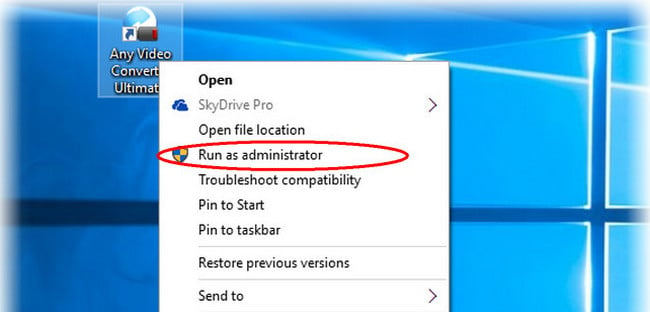
If you want to register this program under a limited user, please refer to Q9, after the 5th step, register this program.
Please follow the steps below to run the program with a limited user account:
1. Login your administrative account.
2. Go to the install directory, right click on "Any Video (DVD) Converter Professional" folder and click "properties". Normally, the directory is C:\program files\AnvSoft\Any Video (DVD) Converter Professional.
3. If there is a Security tab, open it, select the users group, in the Permission for Users section, select "full control" and apply.
4. If there is no security tab, open "Control Panel", open "Administrative Tools", open "Local Security Policy", unfold "Local Policies" and select "Security Options", in the right panel, you can find "Network Access: Sharing and security model for local accounts", double click to open and change it to "Classic - local users authenticate as themselves" and apply. Then go back to "Any Video (DVD) Converter Professional" folder and click "properties". Then follow the third step.
5. Log off and switch to the limited user, then open the program.
Quick Links


"Have captured some Netflix streaming videos. Good quality! " -- Jane White
"Your HTML5 output profile with embedding code, really rocks! Easily shared DV on my site!" -- Eric Gates
"To my surprise, your video converter can also create DVD movies and record videos. Really an excellent bonus!" -- David James
"AVC Ultimate merits its label as the ultimate multimedia solution!" -- Loring Lee


Top Editor Review from PCWorld

Top Editor Review from CNET
 English
 Deutsch
 Français
 日本語
日本語 Italiano
 Español
 Português
 Русский
 Türkçe
 Brasileiro
 Polski
 简体中文
简体中文