
 Mac
Mac
Mac
Mac
Currently, Any Video Converter is available in English, Japanese, German, Spanish, French, Italian, Portuguese, Hungarian, Swedish, Turkish, Traditional Chinese, Simplified Chinese, Arabic, Bulgarian, and Russian etc.
To better serve the customers all over the world, we are planning to localize Any Video Converter into more minor languages. If you are native, if you love AVC' products, if you are desirable to contribute your effort on Any Video Converter globalization, please come to join this program!

Currently, Any Video Converter has gained the favor and popularity among millions of users. Some of them contribute in translating the respective version of Any Video Converter for us fervently. Hereby we thank them for their contributions. We also appreciate any further translation which need to be updated.
You can help us translate Any Video Converter to any target language that you are specialized in, from any of the current versions of the program. All the strings which need to be translated are embedded in the English language files (lang_eng.ini and locale.xml).
For instance, if you volunteer to translate the English version to Norwegian version, just follow these steps:
Step 1. Find the lang_eng.ini
The INI file format is a standard for configuration files. The language configuration of Any Video Converter is stored in the INI files.
Go to the program files folder of Any Video Converter (the path could be X:\Program Files\AnvSoft\Any Video Converter, X stands for the hard disk drive letter such as C, D, E, etc.)
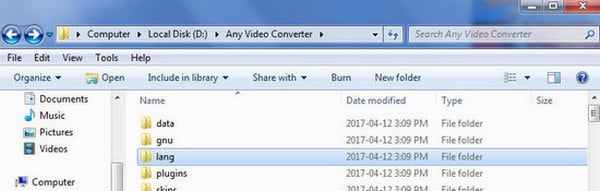
Open the "lang" sub-folder , and you will see the INI files of various languages.
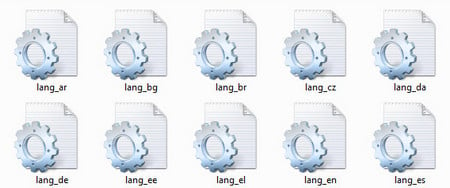
Step 2. Create an INI file named "lang_nor.ini"
Open and copy the lang_en.ini file, and then save it as lang_nor.ini.
Please save the text file with Unicode Encoding, since Any Video Converter is complied with Unicode encoding.

You can edit the general information of the new version that you are going to work at. In the General section of the INI file, you can tell people which version of the Any Video Converter program is being used in your translation, the language. If you wish to be contacted by people who are interested in your translation, you can add your name and email address.
[General]
version=3.31
language=Norwegian
translator=Your name
[email protected]
...
Save the changes, and then restart Any Video Converter, you should see that the Norwegian language option appears in the menu Edit->Language....
Step 3. Translate the INI file
INI files are simple text files with a basic structure. The basic element contained in an INI file is the parameter. Every parameter has a name and a value, delimited by an equals sign (=). The name appears to the left of the equals sign.
name = value
Parameters may be grouped into arbitrarily named sections. The section name appears on a line by itself, in square brackets ([ and ]). All parameters after the section declaration are associated with that section.
For example:
[MENU]
; main menu
item_1="File"
32825="Add DVD..."
...
Another example:
[STRING]
; ClipEffect DLL string resource
1="Video Clipping - %s"
2="OK"
3="Cancel"
You only need to translate the values after the equals sign (=). Please keep the section name and the ID being unchanged.
There are some words that is used for programming language and don't need to be translated. such as
%d
%s
\t
\n
%d
During the translating, you can restart the Any Video Converter program and switch the language option to see if your translation works.
Step 1. Find the lang_eng.ini
The .xml file format is another configuration files of Any Video Converter. Go to the program files folder of Any Video Converter (the path could be X:\Program Files\AnvSoft\Any Video Converter\skins\common\locales, X stands for the hard disk drive letter such as C, D, E, etc.)
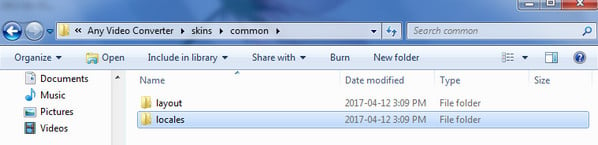
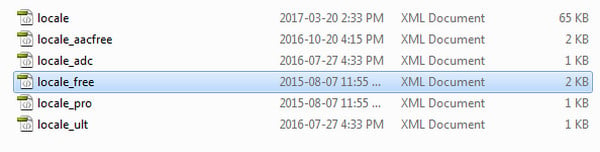
Open the "en" sub-folder , and you will see all 6 local.xml files for Any Video Converter products.
Step 2: Create and Edit the XML files with Notepad++
After opening a text file with NotePad++ or Dreamweaver, please select “Encoding” - “Encode in UTF-8” from the menu as follows.
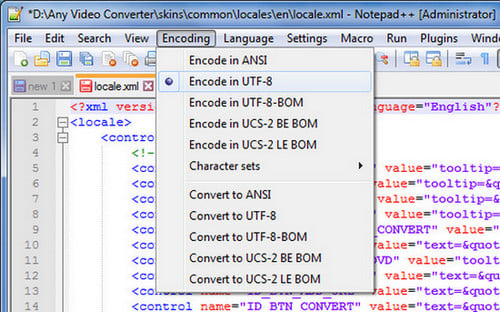
Step 3: Translate the XML files
Note: There are 6 XML files in total respectively for different products for Any Video Converter. It would be much appreciated if you can translate them into your native languages. Here we take an example to label the text you need to translate.

When you complete the translation, you can save the translated files as ZIP files and email it to us at support [at] any-video-converter.com (replace [at] as @ before sending message).
INI Translator ( Download )
NotePad++ ( Download)
Please make sure you would do the translation with INI Translator, Or mistakes may happen. Since we'll only update the original English language file each time. If you download the language file and translate directly on notepad, that may cause leakage and will not work out. Please be noted.

We will acknowledge all volunteers who make contributes to the translation of Any Video Converter in our websites, as well as in the INI and XML fileS. Each translator can:
* Get any product(s) you intend to have(Usually the product you translate for. If you already have had the product, you can ask for another one.)
* Obtain AVCLabs VIP qualification
* Get the chance to enjoy the new function of a product before it releases
* Enjoy VIP customer care and VIP discount
Any question about the translation project, please feel free to contact us at support [at] any-video-converter.com (replace [at] as @ before sending message).

"Have captured some Netflix streaming videos. Good quality! " -- Jane White
"Your HTML5 output profile with embedding code, really rocks! Easily shared DV on my site!" -- Eric Gates
"To my surprise, your video converter can also create DVD movies and record videos. Really an excellent bonus!" -- David James
"AVC Ultimate merits its label as the ultimate multimedia solution!" -- Loring Lee


Top Editor Review from PCWorld

Top Editor Review from CNET
 English
 Deutsch
 Français
 日本語
日本語 Italiano
 Español
 Português
 Русский
 Türkçe
 Brasileiro
 Polski
 简体中文
简体中文